Finance User
What the Katekile Finance User role sees, can do and approves.
Role name in the system: Katekile Finance User
Prepares the finance documents: Sales Invoices from Delivery Notes, Purchase Invoices from GRNs, Payment Entries, Journal Entries and FX revaluations. The role can also submit sales invoices, purchase invoices and payments; journals and revaluations must be submitted by the Finance Manager.
Typical tasks
- Create and submit Sales Invoices (usually from a Delivery Note) and Purchase Invoices (from a Purchase Receipt)
- Create, submit and cancel Payment Entries (receive / pay) and run Payment Reconciliation
- Create Journal Entries and Exchange Rate Revaluations
- Run AR/AP and VAT Audit reports
Your menu
This is the sidebar a user with only this role sees.
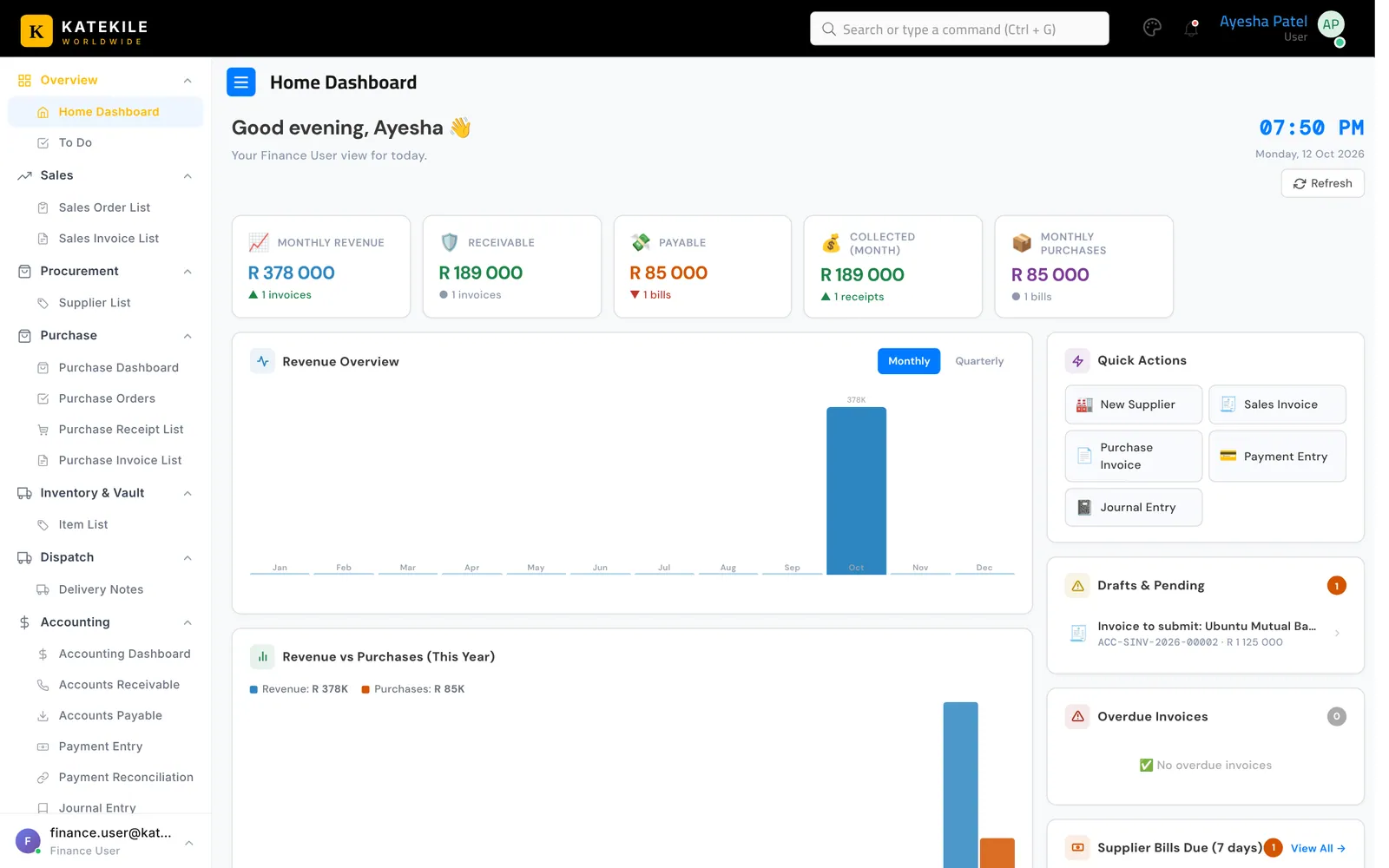
| Menu group | Links you see |
|---|---|
| Overview | , |
| Sales | , |
| Procurement | |
| Purchase | , , , |
| Inventory & Vault | |
| Dispatch | |
| Accounting | , , , , , , |
| Reports | , , , |
What you can do — permissions
| Document | Read | Create | Edit | Submit | Cancel |
|---|---|---|---|---|---|
| Customer | R | — | — | n/a | n/a |
| Contact | R | — | — | n/a | n/a |
| Sales Order | R | — | — | — | — |
| Delivery Note | R | — | — | — | — |
| Sales Invoice | R | C | W | S | — |
| Supplier | R | C | W | n/a | n/a |
| Purchase Order | R | — | — | — | — |
| Purchase Receipt | R | — | — | — | — |
| Purchase Invoice | R | C | W | S | — |
| Item | R | — | — | n/a | n/a |
| Payment Entry | R | C | W | S | X |
| Payment Reconciliation | R | — | W | n/a | n/a |
| Journal Entry | R | C | W | — | — |
| Exchange Rate Revaluation | R | C | W | — | — |
| Account | R | C | W | n/a | n/a |
| GL Entry | R | — | — | n/a | n/a |
Supporting records (15)
| Document | Read | Create | Edit | Submit | Cancel |
|---|---|---|---|---|---|
| Accounts Settings | R | C | W | n/a | n/a |
| Address | R | — | — | n/a | n/a |
| Buying Settings † | R | — | — | n/a | n/a |
| Company | R | — | — | n/a | n/a |
| Cost Center | R | — | — | n/a | n/a |
| Country | R | — | — | n/a | n/a |
| Currency | R | — | — | n/a | n/a |
| Mode of Payment | R | — | — | n/a | n/a |
| Payment Ledger Entry | R | C | W | n/a | n/a |
| Payment Terms Template | R | — | — | n/a | n/a |
| Purchase Taxes and Charges Template | R | — | — | n/a | n/a |
| Sales Taxes and Charges Template | R | — | — | n/a | n/a |
| Supplier Group | R | — | — | n/a | n/a |
| Theme Settings | R | — | — | n/a | n/a |
| UOM | R | — | — | n/a | n/a |
† Read access needed to save purchase/stock documents — see Users & Roles.
n/a — this document type is not submitted; saving it is final.
Approval rights
| Document | From state | Action | To state | Condition |
|---|---|---|---|---|
| Quotation | Draft | Send For Approval | Pending Approval | any user, only the quotation Owner |
| Customer | Draft | Send For Verification | Pending KYC Verification | any user |
| Customer | Pending KYC Verification | Approve | Approved | any user |
| Customer | Pending KYC Verification | Incomplete Data | Incomplete Data | any user |
| Customer | Incomplete Data | Send For Verification | Pending KYC Verification | any user |
Step-by-step guides for this role
Last updated October 16, 2026